February 15, 2014

Rotation: a one prim door (more)

In the previous posting on this topic, I mentioned in its Note 2 that a single call to llSetPrimitiveParams() would create a visual flaw in which the hinge wobbles.  The flaw is caused by moving the center of the door in a straight line as it rotates.  It is corrected by moving the center of the door in an arc around the hinge point.

This drop-in replacement code for shiftTo() performs the interpolation.

shiftTo( vector pEnd, rotation rEnd ) {
    float swingDuration = 5;            // seconds
    integer nSteps      = 50;           // must be positive. 
   
    // start at the current location
    vector   pStart = llGetPos();
    rotation rStart = llGetRot();
   
    // Find the hinge point, get the vector that will swing in an arc
    vector pHinge = pStart + lPhingePoint * rStart;
    vector vecToCenter = pStart - pHinge;
  
    // Get the angle and axis of the global rotation from start to end
    // Since rEnd = rStart * rDelta, left multiply by the inverse 

    // of rStart to isolate rDelta (note 1)
    rotation rDiff = (ZERO_ROTATION / rStart) * rEnd;
    float angle = llRot2Angle(rDiff);
    vector axis = llRot2Axis(rDiff);
  
    integer k; for ( k=0; k < nSteps; k++ ) {

        // for each step, calculate an intermediate rotation difference
        // by interpolating the angle and applying it to the fixed axis
        float angleDelta = k * angle / (nSteps-1);
        rotation rDelta = llAxisAngle2Rot(axis,angleDelta);


        // Use the intermediate rotation to rotate the hinge to center vector
        // Use the intermediate rotation to turn the object
        vector p = pHinge + vecToCenter * rDelta;
        rotation r = rStart * rDelta;            // (note 2)
        llSetLinkPrimitiveParamsFast( LINK_THIS, 

                         [ PRIM_POSITION, p, PRIM_ROTATION, r]);
        llSleep( swingDuration/nSteps );
    }
}


As a bonus the door will slowly open and close. (note 3)

__________________
Note 1
I discuss the algebraic manipulation of rotations and inverse rotations in Rotation: Algebra.

Note 2
You may have noticed that in contrast to start_entry() (cf. note 3 in the prior post) the order of rotation multiplication in shiftTo() is reversed, that is, the change in rotation is right multiplied against the starting rotation.

The order is reversed because both of these rotations have values in the global (region) coordinates.

The difference between A*B and B*A is that one ordering corresponds to each rotation occurring in progressively rotated coordinates (as in start_entry()), whereas the other ordering corresponds to all rotations being in the same coordinates (as in shiftTo()).

Note 3
If you wish to add sound effects, I recommend adding calls to llPlaySound() in touch_start().  Place them before and after the appropriate calls to ShiftTo().

[end]


February 14, 2014

3D Vision II: at ACC Alpha

With the permission of Haveit Neox, the creator of the region ACC Alpha, here are a series of convergent (cross-eyed) viewable stereograms of that region. 

Chess sets are a traditional subject for 3D rendering

Through a screen darkly.  Do visit the Tower

The Tower has many levels and multiple subtexts

Walk the streets of the paper village
Tour the fine galleries

Relax in a cafe at in the shopping/gallery district

You may these easier to view of you download them and view them at a smaller scale.

My preceding post on stereoscopic imaging my be of interest.


[end]

February 13, 2014

Rotation: a one prim door


The simplest method to make a swinging door is to use a box prim that has half of its volume cut away.  The remaining visible section has its local Z axis on an edge.  You can swing the door with

       vector doorRot = llEuler2Rot( < 0, delta, 0 > );
       llSetRot( doorRot * llGetRot() );

where 'delta' is an angle (radians) that alternates positive and negative on each touch.

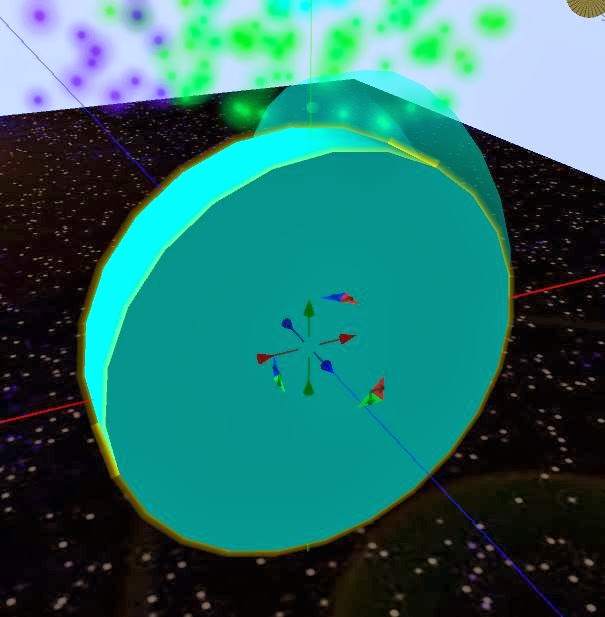
However, if you wish to make a Hobbit door from, say, a cylinder, you can still get the edge hinge effect without cutting the prim.   The trick is to move the center of the door as you rotate it so as to keep the global (region) position of the edge in the same place.

For this discussion, imagine a cylinder with Z sized down to make a disk.  Orient this with its local Y+ axis upward.  The hinge point will be where the prim local X+ axis intercepts the edge of the cylinder.  The prim will rotate around a vertical axis.

Place this script in the prim.  Then touch the prim.


integer isOpen = 0;
float swingAngleDeg = -80;

vector gPdoorOpen;                  // values in global (region) coordinates
vector gPdoorShut;                  // (note 1)
rotation gRdoorOpen; 
rotation gRdoorShut;

vector lPhingePoint;                // value in local (cylinder) coordinates

shiftTo( vector p, rotation r ) {

   // There will be a visual problem with this method (note 2) 
   llSetPrimitiveParams([PRIM_POSITION,p,PRIM_ROTATION,r]);
}
 

////////////////////////////////////////////////////////////////////
default {
state_entry() {
   // The closed position is determined by reset
   gPdoorShut = llGetPos();
   gRdoorShut = llGetRot();

   // The open rotation is an additional local Y axis rotation (note 3)

   vector eulerRot = < 0, DEG_TO_RAD*swingAngleDeg, 0 >;
   gRdoorOpen = llEuler2Rot(eulerRot) * gRdoorShut;

   // Calculate the open position (note 4)
   vector size = llGetScale();
   lPhingePoint = < size.x/2, 0, 0 >;
   gPdoorOpen = gPdoorShut + (lPhingePoint * gRdoorShut) 

                     - (lPhingePoint *     gRdoorOpen);
}

touch_start(integer nTouch) {
   isOpen = !isOpen;
   if ( isOpen ) {

      shiftTo(gPdoorOpen,gRdoorOpen); 
   } else {
      shiftTo(
gPdoorShut,gRdoorShut); 
   }
}

}

This script will work for any prim size or orientation.  Just remember to reset the script if you change the prim position, rotation, or size.
_____________________________ 
Note 1:
In this notation, the first letter is l or g and indicates local or global coordinates.  The second letter is P or R and indicates position or rotation.  The remaining letters describe which specific point.  

Note 2:
While rotating the center of the prim is moving in a straight line.  The result is that the hinge will wobble.  The correct movement is rotating the prim while moving the center of the prim in an arc about the hinge point.

There are two methods to do this:
  • shiftTo() can be a loop that performs a series of small calculated rotations, or 
  • shiftTo() can create a list of incremental positions along an arc and corresponding rotations and pass this list to llKeyFramedMotion(). 
However, llKeyFrameMotion() is a flawed implementation that drifts.  You will have to apply corrections when the motion completes, that is, if it completes.  The irksome details are documented in the caveats here.

See this future posting for the loop series fix.

Note 3:
Why A*B and not B*A?  First, for two combined rotations the order matters.  Second, this problem has two rotation: B = the prim rotation with respect to the region when closed (gRdoorShut = llGetPos()), and A = the addition rotation needed to turn the door from closed to open (llEuler2Rot(eulerRot)).

A is a rotation that is expressed in terms of the local coordinates of the prim that has already been rotated by B.   A is specifically a rotation about the prim local Y+ axis (swingAngleDeg).  In this case, where A is relative to B local coordinates, the multiplication order is A*B.

Note 4: 
The hinge point has both a global (region coordinates) and local (prim coordinates) position value.  By definition a prim rotation converts a vector in a the prim local coordinates to a vector in the global coordinates relative to the prim center.  Therefore the global position of the hinge point is its rotated local vector added to the prim global position.

When the door is open

   gPhingePointOpen = gPdoorOpen + lPhingePoint * gRdoorOpen

and when the door closed is 

   gPhingePointShut = gPdoorShut + lPhingePoint * gRdoorShut

However the hinge does not change position, so the right hand expressions have the same value.  Now solve the equated right side expressions for gPdoorOpen.  Q.E.D.

[end]

February 2, 2014

3D Vision I: stereoscopic imaging

Human binocular vision allows people to directly perceive depth in their local environment (note 1).   By using pairs of pictures created with slightly different camera viewpoints and letting each eye see only one of these pictures, this innate ability can be tricked into experiencing depth (note 2).

____________
In this pair of images the right image camera viewpoint is slightly to the right of the left image camera viewpoint (look closely at the relationship of the blue arrow to one of the red balls). 


If you could 'stare at infinity' in a way that causes your right eye to gaze directly at the right image, and your left eye at the left, then your doubled vision may see a third merged image in the center that has the illusion of depth.   Many people find this to be quite difficult.  We do not have much practice in intentionally diverging our eyes while maintaining a close focal plan.  (note 3)

____________
More people are able to use the 'cross-eyed' viewing technique.  This pair of images has been transposed left to right.


If you can converge (cross) the lines of sight of your eyes while maintaining your focal plane on the images, then your doubled vision may see a third merged image in the center that has the illusion of depth.

____________
All systems that allow you to see 3D in virtual worlds use this technique to create the illusion of depth.  They differ in the methods by which they allow each eye to see one of the images.  They may
  • alternately flicker the two images while you wear glasses with alternating shutters (note 4)
  • show both images but use goggle optics to diverge and focus your eyes to each image (note 2)
  • merge images while tinting each with distinct colors while you wear color screening glasses (note 5)
The optic method allows the images to be placed much closer to the eyes.  By distorting the images with wide view angle and barrel distortion to compensate for the optic effects, you see a more surrounding effect.  (note 2c)

_______________ 
_______________

Note 1: Beyond several meters distance our binocular vision mechanism becomes ineffective and our depth perception relies on other cues such as parallax, scale consistency, atmospheric degradation, light shading, and memory.  When you watch a conventional movie, all of your sense of depth in the scenes comes from these alternate cues.

Note 2: 
a) http://en.wikipedia.org/wiki/Stereogram  
b) http://en.wikipedia.org/wiki/Viewmaster   
c) http://www.oculusvr.com/

Note 3: For diverging ("infinity") viewing it may help to hold up a piece of paper that prevents each eye from seeing the image intended for the other eye.  It may also help to download the images on this post and reduce their size.

Note 4: http://en.wikipedia.org/wiki/Active_shutter_3D_system

Note 5:  http://en.wikipedia.org/wiki/Anaglyph_3D

[end]

December 27, 2013

Generating Bézier Curves

A Bézier curve is a directed path defined by a ordered set of reference points.   It starts at the first point and ends at the last point.  It rarely passes through any of the intermediate points, which instead act as attractors that warp the curve in their direction as the curve passes by them.

For details about this class of curves and several dynamic visualizations, I refer you to the article at this location

http://en.wikipedia.org/wiki/B%C3%A9zier_curve

___________________________________________
This position along a Bézier curve is specified by an independent variable in the range [0,1].  The value '0' is the start of the curve, the value '1' is the end of the curve.

One method of calculating a series of points along a Bézier curve is to use polynomial functions of this variable with coefficients that are linear in the positions of the reference points.  The down side of this method is that you need a different polynomial whenever you change the number of reference points.

My preferred method is recursive (note 1).  Given the ordered list of reference points 'list posList = [ .. vectors...];' and the independent variable 'float s;' in the range [0,1], the calculation proceeds as follows (note 2):

vector getBezierPos( float s ) {
   // This method uses the direct progressive linear interpolation definition
   // of an n-th order bezier, instead of the clumbersome formulae.
   list q = posList;
   integer nq;
   while ( (nq=llGetListLength(q)) > 1 ) {
        list q2 = [];
        integer k; for ( k=1; k < nq; k++ ) {

            vector p1 = llList2Vector(q,k-1);
            vector p2 = llList2Vector(q,k);
            q2 += (1-s)* p1 + s * p2;
        }
        q = q2;
    }
    return llList2Vector(q,0);
}


In the Wikipedia reference, find the dynamic visualization that demonstrates the construction of a Bezier curve as a progression of linear interpolations.  My implementation of getBezierPos() exactly follows that demonstration.

___________________________________________
To elucidate the selection of values of 's', I will add here the function which rezzes prims along the Bézier curve.

integer nDot = 20;
string dotName = "dot";

generateBezierDots() {
    // The Bézier parameters is a variable in the range [0,1].  Divide this
    // interval into nDot segments. Rez dots at the mid point of these segments.
    float step = 0;
    if ( nDot > 0 )  step = 1.0 / nDot;


    integer k; for ( k=1; k <= nDot; k++ ) {
        vector p = getBezierPos( step * (k - 0.5) );
        llRezObject(dotName, p, ZERO_VECTOR, ZERO_ROTATION, 0 );
    }
}


___________________________________________
In my full implementation (note 3) of this script, I use llSensor() to find a series of reference markers.  The sensor() event makes note of the positions and descriptions of these prims, the description fields of the markers are used to sort the data, and the ordered position are stored in posList.

Desdemona

_____________________________________________
Note 1
Purists will note that I did not strictly use a recursive function.  Ultra purists will complain that said function should have been tail recursive.  I will leave it to them to post the pure implementation on their blogs and let them cope with a stack usage that that is quadratic in the number of reference points and with LSL not supporting tail recursion.

Note 2
If you want a vector tangent to the curve, in getBezierPos() catch the value"p2-p1" when nq is 2. 

Note 3
If you would like a copy of my full implementation, come to my vast land empire of 512 m-sq and pick up a copy from my vendor titled "Simple Bezier Curve".  You will get a combo object (mod/copy/trans, including scripts) that includes 4 green reference markers.  Rez this and touch the blue sphere.  Voila, 20 pink dots rezzed along the curve. 

Move the reference markers around and touch the blue sphere again.  Delete reference markers or shift copy more reference markers as you wish, however, make sure they all have distinct descriptions that will order them as you wish.

The vendor is here:

http://maps.secondlife.com/secondlife/Pomponio/191/155/59

[end]

December 3, 2013

Sanitizing Your Strings

Do you have systems that insist on giving you numeric strings with embedded commas, currency symbols, hash marks, and spaces?

data = $12,340.14
data = 0.000 000 013 456
data = #336#

Use this method to concisely remove these annoyances from strings: 

  string text = "whateverAboveMessTheyGaveYou";
  float value = (float) llDumpList2String( 
         llParseString2List(text,["$",",","#"," "],[]),
         "");

[end]

June 28, 2012

Rezzing prims with varying properties

If an object rezzes prims with varying properties (shape, size, color, texture, etc), it can rez a generic scripted prim and then send that prim a message containing a list of values to be given to llSetPrimitiveParams().

The prim to be rezzed would contain this script
 

integer rezzerChannel = -873648273;
integer settingsChannel = -873648274;
default
{
state_entry() { 

     llSetStatus( STATUS_DIE_AT_EDGE, TRUE );
     llListen( settingsChannel, "", NULL_KEY, "" );
}

on_rez( integer rezCode ) {
     if ( rezCode == 0 ) {
         llResetScript();
     } else {
         llSay(rezzerChannel , "primRezzed|"+(string)rezCode);
     }
}

listen ( integer channel, string fromName, key fromKey, string msg ) {
    list a = llParseStringKeepNulls( msg, ["|"], [] );
    if ( llList2String(a,0) == "primSettings" ) {
        if ( llList2String(a,-1) == "END" ) {
            integer n = (integer)llList2String(a,1);
            if ( n > 0 ) {
                list params = decodeTypeList( llList2List( a,2,n+1) );
                llSetPrimitiveParams( params );
            }
        } else {
            llSay(DEBUG_CHANNEL, "*** truncated message");
        }
        llRemoveInventory( llGetScriptName() );
    }
}
}

 
Notes on the rezzed prim script:

  • STATUS_DIE_AT_EDGE keeps errant prims out of your Lost and Found folder.
  • In on_rez(), the special handling of a rezCode of zero allows you to manually rez the prim. The rezzer should give a non-zero rezCode to each object it rezzes.
  • For non-zero rezCodes, the script sends a message back to the rezzer. The rezzer responds with the desired settings.
  • llSay() is sufficient because the prim must have been rezzed within 10 meters of the rezzer.
________________
A rezzer script that creates a green horizontal polygon could be written as follows:

integer rezzerChannel = -873648273;
integer settingsChannel = -873648274;

integer polyCount = 8;

default
{
state_entry() {
    llListen( rezzerChannel , "", NULL_KEY, "" );
}

touch_start( integer nTouch ) {
     
    string name = llGetInventoryName(INVENTORY_OBJECT,0);
    integer k; for ( k=0; k < polyCount; k++ ) {
        llRezObject( name, llGetPos(), ZERO_VECTOR,
                        ZERO_ROTATION, 100 + k);
    }
}

listen ( integer channel, string fromName, key fromKey, string msg ) {
    list a = llParseStringKeepNulls( msg, ["|"], [] );
    if ( llList2String(a,0) == "primRezzed" ) {
         integer index = (integer)llList2String(a,1);
       
        float height = 5;
        float radius = 15; 
        float width = 0.2;
        float length = 2 * radius * llTan( PI / polyCount );

        float angle = index * TWO_PI / polyCount;
        rotation cRot = llEuler2Rot( < PI_BY_TWO, 0,0> )
                * llEuler2Rot( <0, 0, angle > );

        vector cPos = llGetPos() + < 0,0 ,height> 
                         + < radius,0 ,0>* cRot;

        // [ PRIM_TYPE, PRIM_TYPE_CYLINDER, integer hole_shape,
        // vector cut, float hollow, vector twist,
        // vector top_size, vector top_shear ]
        list settingsList = [
            PRIM_TYPE, PRIM_TYPE_CYLINDER, 0, <0,1,0>, 0.0,
                <0,0,0>, <1,1,0>, <0,0,0>,
            PRIM_COLOR, ALL_SIDES, <0,1,0>, 1.0,
            PRIM_SIZE, < width, width, length >,
            PRIM_ROTATION, cRot, 
            PRIM_POSITION, cPos, PRIM_POSITION, cPos, 
            PRIM_POSITION, cPos ];
        settingsList = encodeTypeList( settingsList );

        llRegionSayTo( fromKey, settingsChannel, llDumpList2String(
            [ "primSettings", llGetListLength(settingsList) ]
            + settingsList
            + ["END"], "|" ));
    }
}
}
 
Notes on rezzer script:

  • It does not matter where llRezObject() places the prims since the subsequent message will specify the position.
  • Do not send prim settings in the object_rez() event. The prim may have rezzed, yet it may not have registered its listen event with the region.
  • SET_POSITION is limited to a 10 meter movement, so use several as needed. Given the height and radius used in this script, three was more than sufficient.
  • There is a limit to the number of messages that may be queued to the rezzer. If you will be rezzing more than 30 prims, use a timer to rez them in bursts of 20. Keep track of the number of rezzed prims and the number of messages received. Only rez bursts when the difference is less than 10.
 ________________

General notes:
  • The functions encodeTypeList() and decodeTypeList are described in the post "Interobject Communications: lists" 
  • If the call to llRemoveInventory() is removed from the rezzed prim script, then the rezzer could later change the settings of specific rezzed prims.  In this situation, the rezzed prim script should accept a "primScriptRemove" message.
 
  • Region managers frown on high performance rezzers. You might consider throttling the rezzing by putting a brief llSleep() after llRezObject(), which has an intrinsic delay of only 0.1 second.
  • As a clean-up courtesy to the region server, the rezzed prim script might call llSetTimerEvent()  when the rezCode is non-zero.  The timer event handler would call llDie().
[end]

June 19, 2012

Rotation: algebra

An earlier post on rotational pivoting used a correct yet misleading algebraic slight of hand.  Given the relationship

(1)    vecA = vecB * rotQ

the post solved for vecB by "dividing" both sides of the equation by rotQ:

(2)    vecB = vecA / rotQ

The LSL compiler accepts this expression, however, the concept of 'divide by a rotation' opens many doors to confused thinking.  When solving complex rotational problems, it is safer to think in terms of multiplication by inverse rotations.  

The inverse of rotQ is the rotation that undoes rotQ.   In LSL this inverse is designated using the expression "ZERO_ROTATION / rotQ".   By the meaning of 'inverse'

(3)    rotQ * ( ZERO_ROTATION / rotQ ) = ZERO_ROTATION
(4)    ( ZERO_ROTATION / rotQ ) * rotQ = ZERO_ROTATION   

_________
To solve for vecB using inverse rotations, right side multiplying each side of (1) by the inverse of rotQ

(5)    vecA * (ZERO_ROTATION / rotQ) = (vecB * rotQ) * (ZERO_ROTATION / rotQ)

Calculation precedence does not matter when multiplying vectors and rotation.  Thus the terms on the right side of (5) can be regrouped:

(6)    vecA * (ZERO_ROTATION / rotQ) = vecB * ( rotQ * (ZERO_ROTATION / rotQ) )

Using (3) on the right side of (6), (6) becomes
 
(7)    vecA * ( ZERO_ROTATION / rotQ ) = vecB * ZERO_ROTATION

Since ZERO_ROTATION means not rotating, and since not rotating vecB leaves it unchanged

(8)     vecB * ZERO_ROTATION = vecB.

and therefore

(9)    vecB = vecA * ( ZERO_ROTATION / rotQ )

___________________
If the proof of (3) and (4) seems to be a trivial rearrangement of terms, then you may be thinking in terms of numeric algebra, not vector and rotation algebra.  The use of inappropriate numeric algebraic rules is the cause of many types of logical errors when attempting to solve rotational algebra problems.

In (9) the expression "ZERO_ROTATION / rotQ" is a compiler syntactical trick.  It should not be mentally parsed into the items ZERO_ROTATION, /, and rotQ.  The compiler consumes it as a unit and emits the operation "compute inverse of rotQ".

In equation (2), the expression "vecA / rotQ" is also a compiler syntactic trick and should not be mentally parsed into items.  The LSL compiler treats "vecA / rotQ" as if it were "vecA * ( ZERO_ROTATION / rotQ )".  Thus (2) and (9) express the same result.

___________________
Notes:
  • The formal name for the rule (vecA * rotP) * rotQ = vecA * (rotP * rotQ) is associativity.  This rule means that the expression vecA * rotP * rotQ is unambiguous. 
  • The order of rotations matters.  vecA * rotP * rotQ != vecA * rotQ * rotP unless the rotations have the same axis.  This formal name for this property is non-commutative. 
  • Rotation is distributive when applied to the sum of two vectors.  ( vecA + vecB ) * rotQ = vecA * rotQ + vecB * rotQ

  • When multiplying vectors and rotations, the rotation are always on the right side.  This is a syntactical convention based on desiring vectors to be represented by a horizontal row of numbers in matrix algebra. 

  • The expression rotQ * vecA is meanless.
  • You cannot solve (1) for rotQ = vecA / vecB because a vector does not have an inverse.  This limitation reflects the existence of an infinite number of rotations that carry vecB to vecA.  However, there is a unique smallest angle rotation from vecB to vecA.  llRotBetween(vecB, vecA) gives you this smallest rotation.
  • You may fall into serious logical trouble if you write expressions like vecA / rotP / rotQ because rotational / is not associative, that is (vecA/rotP)/rotQ != vecA*(rotP/rotQ).

  • For more discussion of the rules of rotational algebra consult any text book on computer graphics mathematics and seek the chapters on spatial rotation.  If you consult non-CG text books you will discover the the rest of the world represents vectors as columns and uses left side rotational multiplication.
  • For a more formal discussion of non-commutative algebra read: Introduction to Lie Algebra by Erdmann and Wildon.

    • A common bit of advice is to remark that rotations are quaternions (they are not) and thus the inverse of rotQ can be created using rotQ.s = -rotQ.s.  LSL does indeed represent rotations by quaternions and this technique does work.  However, since the LSL compiler translates the abstract expression "ZERO_ROTATION / rotQ"  into the representation specific operations "tmp = rotQ; tmp.s = -tmp.s;", a laying-of-hands on the internals of a quaternion does not make a script more efficient. 

     [end]

    A deed-once land media manager

    Consider this script fragment:

    integer mediaChannel = -8782764;
    key authorizedUser = "817b2981-aeb6-42db-9478-1d525624c66e";

    default
    {
     
    state_entry() {
      llListen( mediaChannel, "", NULL_KEY, "" );
    }

    listen( integer channel, string fromName, key fromKey, string msg) {
      if ( (channel == mediaChannel)
                  && (llGetOwnerKey(fromKey)==(key)authorizedUser) ) {

        list a = llParseStringKeepNulls(msg,["|"], [] );
        string verb = llList2String(a,0);
        integer match = llListFindList(["setMedia", "queryMedia"],[verb]);
        if ( match >= 0 ) {
          string tag = llList2String(a,1);
          integer n = (integer)llList2String(a,2);
          if ( n > 0 ) {
            list b = decodeList( llList2List(a,3,2+n) );
            if ( match == 0 ) {
               llParcelMediaCommandList( b );
               llRegionSayTo(fromKey, mediaChannel, llDumpList2String(
                          [ verb+"Ack", tag, "ok" ], "|"));
            } else if ( match == 1 ) {
               list c = encodeList ( llParcelMediaQuery(b) );
               llRegionSayTo(fromKey, mediaChannel, llDumpList2String(
                          [ verb+"Ack", tag, "ok",
                              llGetListLength(c)] + c, "|"));
            }
          } else {
             llRegionSayTo(fromKey, mediaChannel, llDumpList2String(
                     [ verb+"Ack", tag, "fail", "no list" ], "|"));
          }
        }
      }
    }

    }

    If you add the encode/decode functions, place the script into a prim and then have that prim deeded to a parcel, then undeeded scripted objects that are owned by the authorizedUser and that send messages on the mediaChannel will be able to manage land media.

    If you are a land manager that hosts exhibits, then you can use this script to give your visiting exhibitors control of the land media without giving them the power to deed objects to the land.

    ____________________________
    Notes:
    • The encodeList() and decodeList() functions are described in the prior post "Interobject Communications: lists".
    • Sending media commands and query reults as encoded lists in messages means that you will never have to add features to this script.  If Linden Labs one day supports a new media action (PARCEL_MEDIA_COMMAND_whatever) then this script will already support that action.
    • The verb 'deed' it is shorthand for the longer, more awkward phrase "deed to a group that owns the parcel or have the parcel owner rez on the parcel".

    June 16, 2012

    Rotation: pivot around a child prim

    Given that an a object can pivot around any point, an object can pivot around a child prim by pivoting around the global position of the child prim.

    Given these values:

    vector gloVecObj    -- the global position of the root prim of an object
    rotation gloRotObj -- the global rotation of the root prim of an object

    vector locVecChild --  the local position of a child prim of an object

    use this fundamental relation between positions and rotations represented in different frame of reference (cf. "Rotation: pivot around a point"):

    (1)    gloVecA = gloVecObj + locVecA * gloRotObj 

    where A will be the child prim.  Thus 

     (2)    gloVecChild = gloVecObj + locVecChild * gloRotObj

    The calculation result of (2), gloVecChild, is the global vector of pivot point.

    ____________________________
    To script this in the root prim, note that

          vector gloVecObj = llGetPos();
          rotation gloRotObj = llGetRot();

    and that for the child with link number 'link'

          list a  = llGetLinkPrimitiveParams( link, [ PRIM_POS_LOCAL ] );
          vector locVecChild = llList2Vector( a, 0 );

    The post "Rotation: pivot around a point" describes how to use this value to perform the pivoting.

    [end]

    June 7, 2012

    Rotation: pivot around a point

    For this discussion there will be two frames of reference: global and local, local being the frame of reference attached to an object's root prim.  Any position can be represented as a vector in either the global or local frame.  In this specific problem, rotations are always represented in the global frame.

    The object has a starting global position and rotation and an ending global position and rotation.  There is a global pivot position.  The algebraic problem to solve is as follows:  Given the pivot position, the starting position, the starting rotation and the ending rotation, determine the ending position.

    The specific relationship for solving this specific problem is that "to pivot about" means that the local vector of the pivot point does not change.

    The general relationship for solving all rotation problems is that for any position, A, a rotation transforms a local vector into global vector in this manner:

    (1)    gloVecA = gloVecObj + locVecA * gloRotObj

    ____________________________
    Represent the beginning and ending positions and rotations of the object by:

             gloVecObjBeg and gloVecObjEnd
             gloRotObjBeg and gloRotObjEnd

    The global position of the pivot point does not change.  Represent it by:

             gloVecPivot

    By the meaning of  "to pivot about" the local position of the pivot point also does not change.  Represent it by:

             locVecPivot

    The local and global pivot positions are related by the general equation (1):

    (2)     gloVecPivot = gloVecObjBeg + locVecPivot * gloRotObjBeg 
    (3)     gloVecPivot = gloVecObjEnd + locVecPivot * gloRotObjEnd   


    Equations (2) and (3) will solved for the local pivot vector which will be elimiated by equating.  The resulting equation will be solved for gloVecPivotEnd in terms of the other known variables.

    ___________________________________
    Step A)        Solve (2) and (3) for the local vectors

    (4)    locVecPivot = ( gloVecPivot - gloVecObjBeg ) /gloRotObjectBeg
    (5)    locVecPivot = ( gloVecPivot - gloVecObjEnd ) / gloRotObjectEnd

    Step B)        Equate the right side expressions of Equations (4) and (5)

    (6)     ( gloVecPivot - gloVecObjBeg ) / gloRotObjBeg
                        =  ( gloVecPivot - gloVecObjEnd ) / gloRotObjEnd

    Step C)        Multiple both sides of (6) by gloRotObjectEnd

    (7)    ( ( gloVecPivot - gloVecObjBeg ) / gloRotObjBeg ) * gloRotObjEnd
                        =  gloVecPivot - gloVecObjEnd 

    Step D)        Rearrange (7) to isolate gloVecObjectEnd

    (8)     gloVecObjEnd = gloVecPivot
                    -  ( ( gloVecPivot - gloVecObjBeg ) / gloRotObjBeg ) * gloRotObjEnd

    __________________________________
    To script this, note that

          gloVecObjBeg = llGetPos();
          gloRotObjBeg = llGetRot();

    and that the script knows gloVecPivot and that the script has calculated a value for gloRotObjEnd.

    After using equation (8) to calculate gloVecObjEnd, the script will change the postion and rotation of the object:

         llSetPrimitiveParams( [ PRIM_POSITION, gloVecObjEnd,
                                                                       PRIM_ROTATION, gloRotObjEnd ] );

    ___________________________
    Notes:
    • The labeling of variables is complex in this problem because it is essential to keep track of the frame of reference of any vector or rotation value.
    • Do not invert the order of rotations in equation (8).
    • Use llSetPrimitiveParameters() to avoid seeing the object shift and rotate in two steps.

    [end]

    Interobject Communications: lists

    Lists contain values of varying types.  If llDumpListString() is used to create a text string which is to be sent as a message, then the value type information is irretrievably lost.

    Preserve the type information by creating a new list in which the type code precedes each value.  The sender might have code like this:

        list a = [ ... some series of values ];
        list b = encodeList(a);
        llSay( commChannel, llDumpList2String( [ "listData", llGetListLength(b) ]
                                   encodeList(b) + ["END"] , "|" );

    The receiver might have code like this

    listen( integer channel, string fromName, key fromKey, string msg ) {
        if ( channel == commChannel ) {
            list f = llParseStringKeepNulls( msg, "|" );
            if ( "listData" == llList2String(f,0) ) {
                if ( "END" != llList2String(f,-1) ) {
                    ... tell some that the message has been truncated
                } else {
                    integer n = (integer) llList2String(f,1);
                    list dataList = [];
                    if ( n > 0 ) {
                       dataList = decode( llList2List( f, 2, 1 + n );
                    }
                    n = llGetListLength(dataList);
                    ........
                }
            }
         }
    }

    The encoder logic might be this

    list typeList = [TYPE_FLOAT, TYPE_INTEGER, TYPE_KEY,
                       TYPE_ROTATION, TYPE_STRING, TYPE_VECTOR ];

    list encodeTypeList( list a ) {
        list b = [];
        integer n = llGetListLength(a);
        integer k;  for ( k=0; k < n; k++ ) {
            integer type = llGetListEntryType(a,k);
            integer match = llListFindList( typeList, [type] );
            if ( match >= 0 ) {
                b += [type] + llList2List(a,k,k);
            } else llOwnerSay("** failed to match list entry type: "+(string)type);
        }
        return b;
    }

    The decoder logic might be this:

    list decodeTypeList( list a ) {
        list b = [];
        integer n = llGetListLength(a);
        integer k;  for ( k=0; k < n; k += 2 ) {
            integer type = (integer) llList2String(a,k);
            string svalue = llList2String(a,k+1);
          
            integer match = llListFindList( typeList, [type] );
            if ( match >= 0 ) {
                if ( match-- == 0 )     b += (float) svalue;
                if ( match-- == 0 )     b += (integer) svalue;
                if ( match-- == 0 )     b += (key) svalue;
                if ( match-- == 0 )     b += (rotation) svalue;
                if ( match-- == 0 )     b += svalue;
                if ( match-- == 0 )     b += (vector) svalue;
            }
        }
        return b;
    }

    __________________

    Notes:
    • When sending variable length lists, append "END" to the end of the message and have the receiver verify that it is still there.  There is a limit to the length of messages.
    • Include the encoded list length in the message, so that the receiver can extract the list.
    • Since lists may have zero length, the receiver should handle the zero length case.
    [end]